


New Feature - Expiration of alerts on WaterAlert
We’re adding expiration to alert subscriptions to keep the WaterAlert system performing well and reducing costs.
Since the modernized version of WaterAlert was launched in 2022, it has grown to help over 60,000 users stay informed about changing water conditions at their selected monitoring locations. Automatic alerts by email or text inform users when conditions meet threshold values they have set, and in 2025 the WaterAlert system sent over 13.5 million alerts with spikes of over 350,000 per week during critical events and emergencies in the spring and summer.
Over time, however, many alert subscriptions remain active long after they are still needed—whether from short-term projects, testing, or outdated relevance to the user. To keep WaterAlert responsive and focused on the alerts that matter most, we’re introducing a new feature: alert expiration.
Why introduce expiration?
The number of WaterAlert users and alerts has grown each year since the modernized version was released. Between October 2024 and September 2025 nearly 9 million email alerts and 5 million text alerts were sent, an increase of 11% over the previous year. Expiration helps ensure that notifications continue to reach people who want themby clearing out alerts that are no longer relevant to and helping maintain a reliable service while managing our system resources wisely.
Removing unused alerts helps keep the WaterAlert system performing well, especially during widespread or multi-day flooding events when spikes in outgoing notifications can strain the system. Unwanted alerts add to the system burden without helping users monitor rapidly changing water conditions, which was the most common use case reported in our 2022 user survey. During flooding events, many alerts need to go out at the same time and unused alerts can add to the strain, potentially leading to missed or delayed notifications.
How does the new expiration feature work?
Each alert subscription now has an expiration date, set one year from when the alert is created, edited, or renewed. As that date approaches, subscribers will be notified by email and can choose to renew or let the alert expire.
Here’s what to expect:
- You’ll receive an email warning you of an expiring alert two weeks before it expires. The message includes a link that takes you directly to the alert that needs attention.
- When you log in to WaterAlert, alerts that have expired or will expire soon will be highlighted in yellow so you can quickly identify which alerts need review.
- Click the “Renew” button on any alert you want to keep, and its expiration date will update to one year from today. There’s no need to recreate the alert or adjust any of its settings.
- If you no longer need an alert, you can remove it from your list at any time.
Alerts that have passed their expiration date will stop sending notifications until you choose to renew them. Nothing is deleted automatically—you remain in control of which alerts stay active.
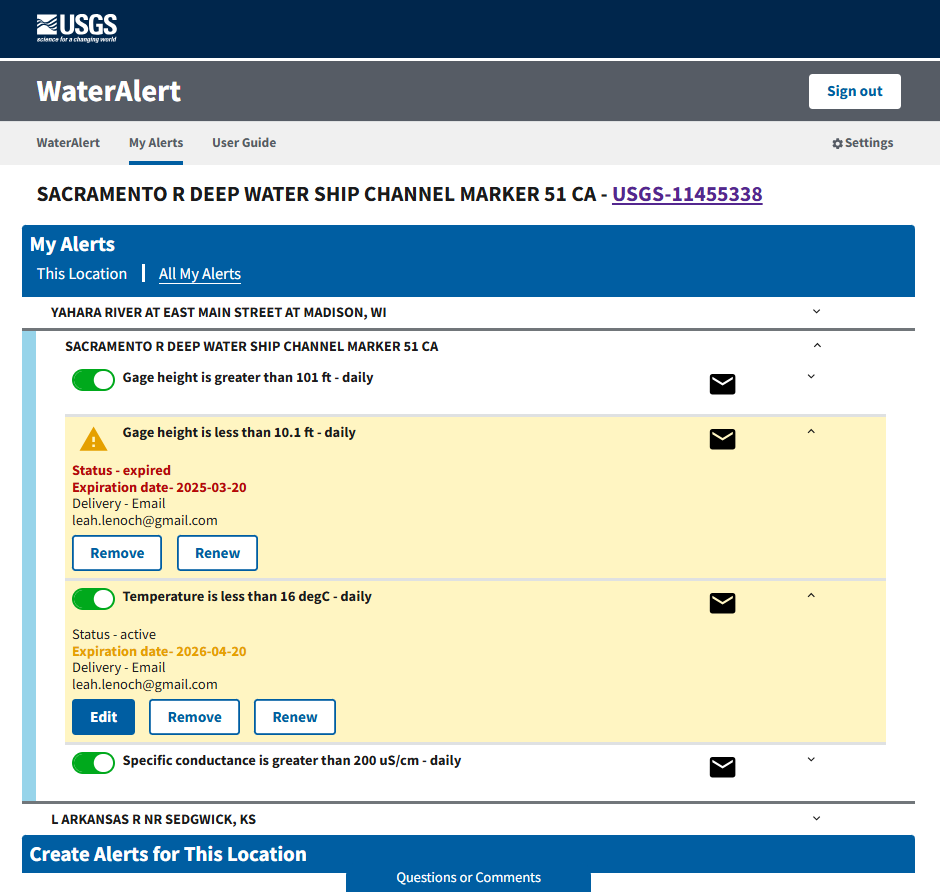
Alerts that have expired or will soon expired are highlighted in yellow in your list of alerts. Click the Renew button to update the expiration data for any alerts you want to continue to receive.
What this means for WaterAlert users
This update helps keep the WaterAlert system focused on the alerts users truly rely on. An expiration date will now be set when you edit an alert or create a new alert. In the fall of 2026, we plan to set expiration dates for alerts that do not have one, and these will be set for one year in the future. You will receive reminder emails when an alert needs review and can renew alerts with a single click from your My Alerts list. By periodically reviewing your subscriptions, you help keep WaterAlert running smoothly and ensure that alerts remain purposeful and relevant.
You can read Frequently Asked Questions about WaterAlert to learn more about setting and receiving alerts by email or text.
Help improve WaterAlert
We are focused on continual improvement of WaterAlert. Our team uses user-centered design processes to determine what to prioritize next. Let us know how the WDFN pages are working for you or reach out for help with your WaterAlert subscriptions by emailing wdfn@usgs.gov.
Categories:
Related Posts
Modernized access for USGS rating curves is now available
August 14, 2026
Modernized access for USGS rating curves is now available
The USGS publishes rating curves describing the relationship between stage and streamflow at a monitoring location. Historically, these curves have been published at the NWISWeb Ratings Depot, available at https://waterdata.usgs.gov/nwisweb/get_ratings.
Peak Measurements in WDFN
August 14, 2026
There has been a lot of change to how you access USGS water data as we work to modernize data delivery in WDFN and decommission NWISWeb. As we centralize data delivery in WDFN, we have described different types of water data according to data collection categories. We re-organized and expanded the data collection categories that are delivered on the Monitoring Location Page and are now working to deliver additional data collection categories on WDFN. This blog is part of a series to help orient you to where you can find different types of data in WDFN pages and services. In this post, we focus on how you can access peak measurements in WDFN.
Updates and improvements to the National Water Dashboard
March 19, 2026
The National Water Dashboard (NWD) continues to evolve as we modernize our water-data delivery tools and improve how users discover, explore, and interact with real‑time information. Our latest set of updates focuses on simplifying the map experience, improving usability, adding new ways to customize your view, and continuing our long‑term transition away from legacy services. Below is an overview of what’s new.
Modernizing How You Access Water Data | Webinar on Oct 13 | Recording Available
October 1, 2021
Missed the webinar? Watch the recording
The recording of this webinar can be viewed on the USGS website or on the USGS YouTube channel.
Additional field measurements are coming to WDFN
June 25, 2026
Water Data for the Nation (WDFN) publishes multiple categories of data collected at our monitoring locations, including both data collected by automated sensors and through manual methods. Manually collected data, which we refer to as “field measurements,” are collected during visits to a monitoring location.